
|
| 4Play | Unlock your 4DTV's potential! |
What's 4Play?
4Play (actually, 4p.exe) is a program that allows you to change the channel definitions in Motorola's 4DTV satellite receiver. The DSR-905 receiver is fully supported and experimental support is now available for the DSR-920 and DSR-922.
4Play allows you to read the channel definitions sent by Motorola - channels such as HBO, Showtime and PBS - and then merge these definitions with your own special channels that aren't defined by Motorola despite their unencrypted transmission on satellite.
4Play is free software. We waited four years for General Instrument and now Motorola to add proper manual DCII tuning to the 4DTV and they didn't. This approach isn't perfect, but it's better than nothing. Enjoy!
Warning!
Doing of the things described here will void your receiver's warranty. It's worth pointing out that no modifications are required to the receiver - you just have to connect the BDM cable.
Please note that the 4DTV's power supply is unprotected by a shield. There are lethal voltages present around the power supply. Whenever the 4DTV's lid is removed, it must be disconnected from the wall.
Also note that we simply figured out how the channel definitions are stored in a 4DTV receiver - we don't have any inside information as to really do this right so this might screw up your receiver's memory or at least crash the receiver more often than it would by itself. Each time this has happened to us, we've just done a factory reset and then reloaded our custom channels, but using the software here may totally screw up your receiver to the point where it no longer functions.
You have been warned - if you die or screw up your receiver/computer, you're on your own!
Special Notes for DSR-920 and DSR-922 Owners
We have not tested 4Play with the DSR-922 receiver. We have tested with the 920 and currently, there are problems defining analog channels. Therefore make sure you have a backup copy of the SRAM. You'll need to restore this SRAM once you're done experimenting with 4Play. When using 4Play defined channels, you won't be able to access any analog channels, but you'll get all the digital stuff correctly.
It also appears that the DSR-920 and DSR-922 don't have "business" mode - this means if you tune a transponder that's transmitting channel maps for the 4DTV, the chances are your custom channel maps will get destroyed and you'll need to restore SRAM. We're working on a solution to this problem.
Also please note that the DSR-920 hardware doesn't allow reception of signals with a symbol rate less than 19.51 MSps. When 4Play does it's thing, it discards all incompatible signals from the channel map. There's no point defining them because they won't lock - we tried!
What do I need to do this?
How do I set things up (generic info)
First, get the receiver next to your computer or vice versa. Keep in mind that parallel cables aren't meant to be run long distances so limit your cables to ten feet or use a parallel port extension system which can be found at many computer resellers.
Follow one of the sections below on opening the receiver and connecting the BDM. Once this is done, connect the parallel cable to your parallel port and apply power to your receiver. The receiver should start up normally. Wait for the receiver to completely start up - the firmware needs to run long enough to setup the peripherals like the SRAM.
How do I connect to a DSR-905?
To open up your receiver you need a #10 Torx screwdriver. Once you've got the receiver open you'll a circuit board that looks like this picture (click to view full size):
Make sure the receiver is disconnected from the wall and connect the BDM cable to the receiver's BDM connector as shown in the picture below. Make sure the red stripe is next to the arrow on the receiver's circuit board.
|
|
How do I connect to a DSR-920?
[This needs work]
Open the receiver, remove the VC2+ decoder and then all the metalwork around the VC2+ decoder. You'll then be able to get to the main board. The BDM connector is next to the 68331 processor.
How do I connect to a DSR-922?
[This needs work]
Probably the same as the DSR-920, but I've never seen a DSR-922 receiver...
How do I setup custom channels?
First, you will want to ensure that the receiver has a complete channel map from Motorola. To do this, press Option 601 and make sure Installation Type is set to "Home". Then tune to Galaxy 10R transponder 7 (G0-300) and go to Diagnostics G (Option 605 and then press the left arrow once). The number above the word TDT is the total channel definition count - wait for at least 10 minutes with this value stable - if it increments, wait another 10 minutes.
Now the receiver has a complete Motorola channel map, so we next need to tell the receiver to stop receiving channel maps from Motorola, so press Option 601 and ensure that Installation Type is set to "Business". If you don't do this, Motorola's channel maps will wipe out your own definitions.
Next launch the 4Play program. You'll see:
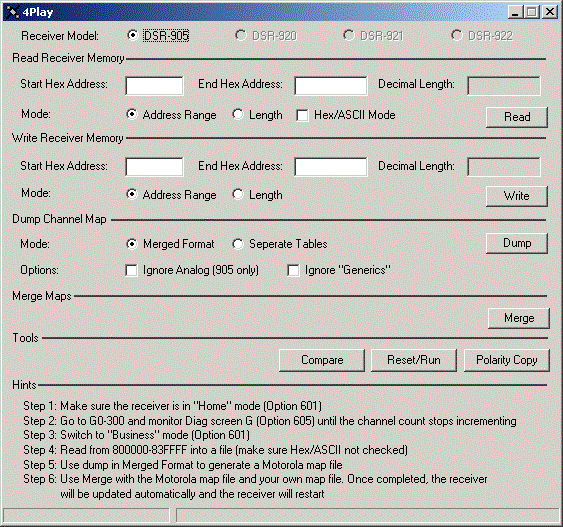
Set the Read Receiver Memory Start Hex Address to 800000 (8 and five zeros) and the End Hex Address to 83ffff and click the Read button. You'll then be asked to select an output file - choose something like 4dtvsram.bin. Ensure you make a backup copy of this file somewhere safe.
Next, click on the Dump button and you'll be asked to select an input binary file - choose the 4dtvsram.bin file we just created and send the output to a file like motorola-maps.txt. You can read this file with a program like Notepad - it lists all the info needed for each channel that's defined by Motorola.
Now you can edit the addon-maps.txt file that's provided with the 4Play program and add your own definitions to those already listed. Just follow the format described at the start of the file (which is the same as the file created in the previous step).
To merge your maps and Motorola's, click the Merge button. You'll be asked to select the Motorola map file, your map file and the file containing your receiver's SRAM image (the 4dtvsram.bin file we created earlier).
Once the merge is completed, the receiver will be reset and once it's back up and running, you'll be able to tune the channels you defined in addition to the ones that Motorola defined.
This isn't manual tuning! How do I do manual tuning?
You can't. Well, you can. Sort of...
What 4DTV users really want is the ability to add channels to those transmitted by Motorola and have the receiver remember these, but that's actually quite complicated to do for Motorola because of the way the DCII standard works. We could theoretically patch the 4DTV's firmware to allow you to do this, but their firmware is about 1.5MB of compiled C code and means that adding this kind of feature ourselves would be a colossal project.
You can do the same thing as manual tuning just by defining the channels you want in the addon-maps.txt file - just follow the format shown and do another Merge.
I see a blip on my spectrum analyzer, how can I figure out if this a DCII channel?
The DSR-905 does have manual front-end tuning. Press Option 67781 and you'll be able to have the receiver search all the DCII modes and if you're lucky enough to get a lock (and give the thing about 1/2 an hour per blip), go to Option 605 and then Diagnostics C where you can see the exact frequency, symbol rate and FEC. Once you know these, make the info public on the 4DTV Forum Projects Section and we'll figure out what's there and make the appropriate entries you need for addon-maps.txt available.
If you don't understand what's displayed on the Diagnostic Screens, take a look at this page.
How does this affect "Generic" satellites?
It means you don't need them any more. Generic satellites were added by people that no longer work for Motorola that actually cared about your ability to use your receiver close to it's full potential, but without having Motorola re-write the firmware to support proper manual tuning. If you know of a generic that works for a channel, just copy it's parameters to a real channel definition on the correct satellite by adding the definition to the addon-maps.txt file.
What additional channels can I get?
The following channels are transmitted unencrypted and can easily be received without using "Generics":
Annenburg Project TV (K3)
Louisiana Public Broadcasting (L4)
Renaissance Network (W1)
4 channels of Kentucky Educational TV (K1)
9 channels of Cyclesat (K1)
KRMA (GB)
Oxygen (GB)
NUE (GB)
Access TV (GB)
BET on Jazz International (GB)
MBC (GB)
2 channels of Palomar Community College (X0)
Oklahoma PBS (K5)
All 53 Music Choice audio feeds (C3)
plus a number of PBS feeds if you know where to look
Provided you have a subscription, you can also receive:
3 extra channels of Showtime/TMC (mountain time) (G0)
3 extra channels of Showtime/TMC (central time) (C3)
TV Land (C3)
2 MTV channels (C3)
Is this illegal?
Nope. We're not doing anything with the conditional access system that's built into DCII - we're merely telling the receiver about channels that it can receive, but Motorola elects not to include in it's channel maps.
I tuned a new channel and all of a sudden, I can't receive any channels. What's up?
The receiver probably downloaded a set of channel definitions that overwrote ours. Use the backup copy of SRAM you made when you first installed the software (you did make a backup didn't you?). Write it location 800000 through 83FFFF and then reboot the receiver.
If you didn't make a backup, press Option 67786 to do a factory default. You then point the receiver at G0-7 and leave it to download the channel maps again.
What if Motorola sends down new firmware for the receiver that breaks this?
Make a copy of your Flash. Read from memory location 0 through 1FFFFF (this is the receiver's Flash memory) into a file and keep it somewhere safe. If Motorola breaks the approach we're using, we'll make available a new version of 4Play that allows you to re-flash your receiver with the older code.
I'm having trouble receiving signal X. Why?
Many of the channels that can be received by a 4DTV receiver reprogrammed with 4Play are weak signals designed for a specific purpose with a specific link budget in mind. If a signal is too weak, try re-aligning your dish and if you still can't receive a signal, get a larger dish.
For development, we used a 3 meter mesh dish with a 150KHz PLL C-Band LNB and a 25KHz PLL Ku-Band LNB and there were some known DCII signals that we couldn't lock with both the 4DTV and a commercial DCII receiver.
SCPC channels (the narrow bandwidth stuff) are unreliable. Why?
All of the 4DTV channels that Motorola defines are wideband signals that can be locked with just about any old LNB, even one that drifts in frequency badly. Skyvision suggests a new LNB for digital signals to prevent "tiling" - technically, this is incorrect - if an LNB drifts too much in frequency, it'll cause the frontend's AFC range to be exceeded and the receiver will loose lock and have to reacquire the signal. This causes a blank picture followed by reappearance of the picture - not tiling.
Some of the feeds that can be received by the DSR-905 are about 4MHz wide - if you use an old, unstable LNB, the problem of frontend lock and de-lock will be much more apparent. Even the "digital-ready" LNBs may drift by a few MHz so if you want to play with SCPC stuff, get a name brand high-stability or even better, a PLL LNB. We recommend either Norsat or California Ampilfier.
What do I do if I need help?
Go to the 4DTV Forum and make a post in the Projects Section about your problem.